What is a Headless CMS? A Complete Manager's Guide (2026)
Introduction
Content infrastructure decisions shape how fast your team ships. In 2026, headless CMS has matured—but choosing between traditional and headless remains a strategic challenge.
This guide provides clarity: what headless CMS means, when it makes sense, and how to evaluate fit for your organization.
What is a Headless CMS?
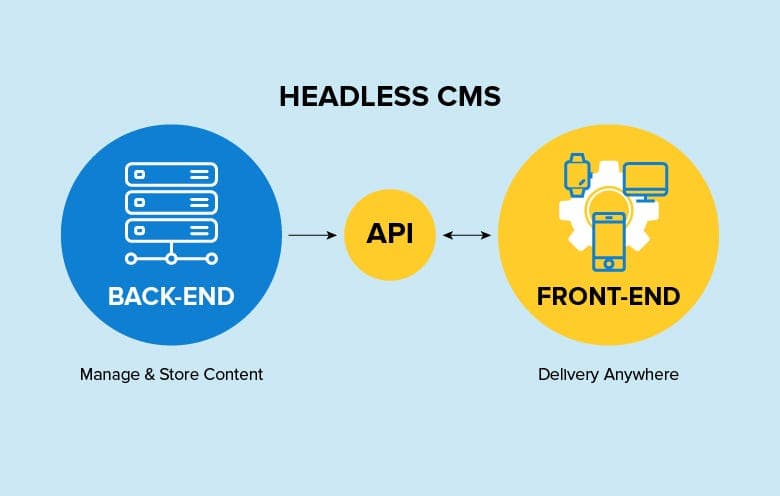
A headless CMS separates content management from presentation. The "head" (frontend) is decoupled from the "body" (backend).
Core components:
- Content Repository: Stores structured content as data
- API Layer: Delivers content via REST/GraphQL to any frontend
- Admin Interface: Where editors create content
Analogy: A commercial kitchen prepares dishes without knowing if they'll be served in-house or delivered. How content reaches users is handled separately from how it's stored.
Headless vs Traditional CMS
Criteria | Traditional | Headless |
|---|---|---|
Flexibility | Limited to templates | Complete freedom |
Omnichannel | Web-only | Multi-platform native |
Developer experience | Often frustrating | Modern, familiar tools |
Editor experience | Visual WYSIWYG | Structured content |
Security | Large attack surface | Smaller footprint |
Pro Tip: Don't assume headless is automatically better. Match architecture to requirements, not trends.
Key Benefits for Managers
Technology Freedom — Team chooses their stack. Hiring gets easier; you need JavaScript developers, not platform specialists.
Scalability — Content delivery becomes API caching and CDN distribution. Familiar optimization territory.
Future-Proofing — Frontend and backend evolve independently. Redesigns don't require content migrations.
Team Productivity — Developers and editors work in parallel. Fewer blocking dependencies.
Omnichannel — Same content serves web, mobile, IoT—one source of truth.
Challenges & Solutions
Initial Complexity — Separate systems to manage. Solution: Clear infrastructure planning; use managed hosting.
Preview Functionality — Requires implementation. Solution: Choose platforms with built-in preview (Storyblok, Sanity).
Editor Learning Curve — Structured content feels different. Solution: Invest in onboarding; start with simpler content types.
Pro Tip: Factor challenges into timelines. Underestimating transition causes blame on technology rather than planning.
When to Choose Headless?
✅ Fits if: multichannel delivery needed, custom frontend essential, microservices architecture, strong frontend team, scale planned.
❌ Skip if: simple blog/brochure site, limited technical resources, extremely tight timeline, editors need full autonomy.
Pro Tip: Run a proof of concept first. Test real workflows with both developers and editors.
Conclusion
Takeaways:
- Headless decouples content from presentation—enabling flexibility and omnichannel delivery
- Higher initial complexity trades for architectural benefits
- Success depends on team capabilities, not just platform features
Next: Assess current workflows, identify pain points, evaluate whether benefits outweigh transition investment.
Share this article