Introduction
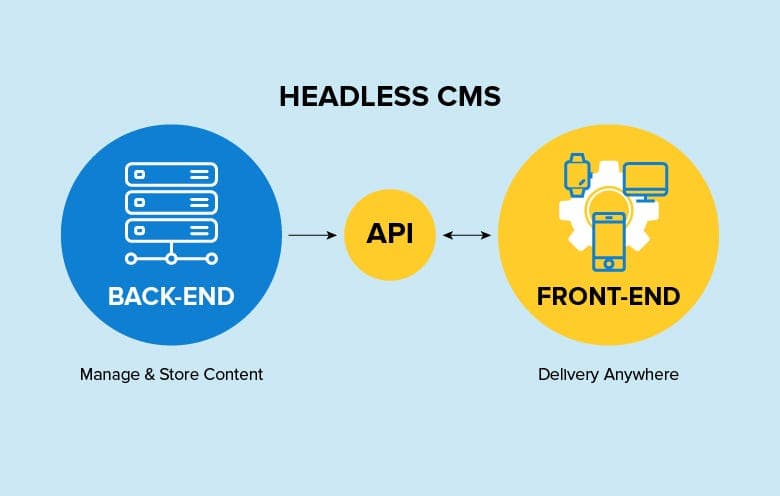
A headless CMS is a content management system that decouples the content repository (the "body") from the presentation layer (the "head"). Unlike traditional CMS platforms that bundle content management with front-end rendering, a headless CMS exposes content exclusively through APIs, giving development teams complete freedom over how and where that content appears.
Understanding the architecture behind headless CMS is crucial when evaluating platforms for your next project. The architectural decisions made by CMS vendors directly impact your application's performance, scalability, security posture, and long-term maintainability. Whether you're building a marketing website, a multi-tenant SaaS platform, or an omnichannel commerce experience, the underlying architecture determines what's possible and what's painful.
In this article, you'll gain a comprehensive understanding of how headless CMS architecture works under the hood. We'll examine the core components that make up these systems, trace the journey of content from creation to delivery, explore common integration patterns, and discuss the trade-offs between different architectural approaches. By the end, you'll be equipped to make informed decisions when comparing headless CMS platforms for your specific requirements.
Traditional CMS vs Headless CMS Architecture
The Monolithic Approach
Traditional content management systems like WordPress and Drupal follow a monolithic architecture where content management, business logic, and presentation rendering are tightly coupled within a single application. In this model, the CMS controls everything: it stores your content in its database, processes requests through its routing system, applies templates using its templating engine, and delivers fully-rendered HTML pages to the browser.
This architecture diagram illustrates the traditional approach:
[Diagram 1: Traditional CMS Architecture] Designer notes: Show a single large box labeled "Monolithic CMS" containing four stacked layers: Database → Business Logic → Template Engine → HTML Output. Arrows should flow upward, with a browser icon receiving the final HTML. Include icons for PHP/MySQL to indicate typical tech stack.
While this approach offers simplicity for basic websites, it creates significant constraints as projects grow in complexity:
Tight coupling limitations: Changes to the presentation layer often require modifications to the CMS itself. Want to redesign your site? You'll likely need to rebuild templates within the CMS ecosystem, using its specific templating language and adhering to its conventions.
Technology lock-in: Your front-end team must work within the constraints of the CMS's chosen technology stack. A WordPress site means PHP templates; a Drupal site means Twig. Modern JavaScript frameworks like React or Vue require awkward workarounds.
Scalability bottlenecks: Monolithic systems must scale as a single unit. Heavy traffic doesn't just stress your content delivery—it stresses your entire CMS, including the admin interface and content API.
Multi-channel challenges: Serving content to mobile apps, IoT devices, or digital signage requires building separate integration layers, often duplicating content or creating synchronization nightmares.
The Decoupled Paradigm
Headless CMS architecture fundamentally reimagines this relationship by separating concerns into distinct, independently deployable systems. The CMS focuses solely on content management and API delivery, while presentation becomes the responsibility of purpose-built front-end applications.
[Diagram 2: Headless CMS Architecture] Designer notes: Show two separate boxes. Left box: "Headless CMS" containing Admin Panel, Content Repository, and API Layer. Right side: Multiple client boxes (Web App, Mobile App, IoT Device, Digital Signage) all connected to the CMS via API arrows. Include a CDN layer between CMS and clients. Use different icons for each client type.
This API-first approach delivers several architectural advantages:
- Technology agnosticism: Front-end teams choose their preferred frameworks, whether that's Next.js, Nuxt, SvelteKit, or native mobile development
- Independent scaling: Content delivery infrastructure scales separately from content authoring
- True omnichannel capability: A single content API serves unlimited presentation channels
- Improved security posture: The CMS never directly faces end-users, reducing attack surface
Core Components of Headless CMS Architecture
Every headless CMS, whether it's Strapi, Contentful, or Sanity, shares a common set of architectural components. Understanding these building blocks helps you evaluate how different platforms implement the headless paradigm.
Content Repository
The content repository is the foundational data layer where all structured content resides. Unlike traditional CMS platforms that often store content as HTML blobs, headless systems treat content as structured data with defined schemas.
Database choices vary significantly across platforms:
- Relational databases (PostgreSQL, MySQL): Used by self-hosted solutions like Strapi and Directus. Offers strong consistency, complex queries, and familiar tooling.
- Document databases (MongoDB): Popular with Payload CMS and optional for Strapi. Provides flexible schemas and natural JSON storage.
- Proprietary data stores: SaaS platforms like Contentful and Sanity use custom-built storage optimized for content operations.
Content models define the structure of your content through fields, relationships, and validation rules. A well-designed content repository enforces data integrity while remaining flexible enough to evolve with your content needs.
API Layer
The API layer is the communication gateway between your content and the applications that consume it. This is where the "headless" concept becomes tangible—instead of rendering pages, the CMS exposes content through programmatic interfaces.
REST API vs GraphQL:
Most headless CMS platforms offer REST APIs, and many now also support GraphQL. Here's how a typical REST response might look:
json
{
  "data": {
    "id": "article_7x9k2m",
    "type": "article",
    "attributes": {
      "title": "Understanding Microservices",
      "slug": "understanding-microservices",
      "content": "Microservices architecture breaks applications...",
      "publishedAt": "2024-01-15T09:30:00Z",
      "author": {
        "id": "author_3n8p1q",
        "name": "Sarah Chen",
        "avatar": "https://cdn.example.com/avatars/sarah.jpg"
      }
    },
    "meta": {
      "createdAt": "2024-01-10T14:22:00Z",
      "updatedAt": "2024-01-15T09:28:00Z"
    }
  }
}
The equivalent GraphQL query gives clients precise control over returned data:
graphql
query GetArticle($slug: String!) {
  article(where: { slug: $slug }) {
    title
    content
    publishedAt
    author {
      name
      avatar {
        url
      }
    }
    categories {
      name
      slug
    }
    seo {
      metaTitle
      metaDescription
      ogImage {
        url
      }
    }
  }
}
Authentication and rate limiting protect the API from abuse. Common patterns include:
- API keys for simple read-only access
- JWT tokens for authenticated user sessions
- OAuth 2.0 for third-party integrations
- Rate limiting to prevent abuse (typically measured in requests per second or per minute)
Admin Panel
The admin panel provides the interface where content creators, editors, and administrators manage content. Despite being "headless," a CMS still needs an intuitive head for content operations.
Modern admin panels offer:
- Visual content editing with rich text editors, media libraries, and component-based page builders
- Live preview functionality that renders content in the context of your actual front-end
- Workflow management including draft states, scheduled publishing, and approval chains
- Localization support for managing content across multiple languages and regions
- Role-based permissions controlling who can create, edit, publish, or delete content
The quality of the admin experience directly impacts content team productivity and adoption.
CDN and Caching
Content delivery networks and caching strategies are architectural concerns that dramatically affect performance. While some platforms include CDN infrastructure, others rely on external solutions.
Edge caching stores API responses at geographically distributed points of presence (PoPs), reducing latency for global audiences. When a user in Tokyo requests content, they receive it from a nearby edge server rather than waiting for a round-trip to a server in Virginia.
Cache invalidation ensures content updates propagate quickly. Strategies include:
- Time-based expiration (TTL): Content automatically refreshes after a defined period
- Tag-based invalidation: Updating content triggers invalidation of related cache entries
- Webhook-driven purging: Content changes fire webhooks that trigger CDN cache purges
Webhooks and Events
Webhooks transform a headless CMS from a passive content store into an active participant in your development workflow. When content changes, the CMS can notify external systems in real-time.
A typical webhook payload looks like this:
json
{
  "event": "entry.publish",
  "createdAt": "2024-01-15T09:30:00Z",
  "model": "article",
  "entry": {
    "id": "article_7x9k2m",
    "title": "Understanding Microservices",
    "slug": "understanding-microservices"
  },
  "metadata": {
    "triggeredBy": "user_admin_1",
    "environment": "production"
  }
}
Common webhook integrations include:
- Static site rebuilds: Triggering Vercel, Netlify, or custom CI/CD pipelines when content changes
- Search index updates: Synchronizing content with Algolia, Elasticsearch, or Meilisearch
- Cache invalidation: Purging CDN caches for updated content
- Notification systems: Alerting teams via Slack or email about content events
Data Flow: From Content Creation to Delivery
Understanding the end-to-end data flow reveals how headless CMS architecture translates into real-world content delivery. Let's trace a piece of content from creation through consumption.
[Diagram 3: Content Data Flow] Designer notes: Create a horizontal flow diagram with numbered steps. Show: (1) Editor at computer → (2) Admin Panel → (3) Database cylinder → (4) API Layer → (5) CDN cloud → (6) Multiple endpoints (browser, phone, smart device). Include bidirectional arrows where appropriate and label each connection (HTTPS, REST/GraphQL, etc.).
Step 1: Content Creation in the Admin Panel
A content editor logs into the admin panel and creates or modifies content. They might be writing a blog post, updating product descriptions, or configuring a landing page using modular components.
The admin panel validates input against the content model, checking required fields, data types, and custom validation rules. Rich media assets are uploaded to the media library, typically stored in cloud object storage (AWS S3, Google Cloud Storage, or Cloudinary) with automatic optimization and transformation.
Step 2: Persistence to the Database
Upon saving, the CMS persists the content to its data store. This involves:
- Version control: Many platforms maintain content history, enabling rollbacks and audit trails
- Relationship resolution: Linking related content entries (author → article, category → product)
- Index updates: Updating search indices for admin panel queries
- Draft vs. published states: Maintaining separate versions for work-in-progress and live content
Step 3: API Request from Front-End
When a user visits your website or opens your mobile app, the front-end application requests content from the CMS API. This request includes:
- Authentication credentials: API keys, JWT tokens, or session identifiers
- Query parameters: Filters, pagination, field selection, and population of related content
- Localization context: Requested language and region
The API layer processes this request, checking permissions, executing the query against the database, and formatting the response.
Step 4: Caching and CDN Delivery
Before reaching the client, the response may pass through multiple caching layers:
- Application-level cache: In-memory caching (Redis, Memcached) for frequently accessed content
- API gateway cache: Edge caching at the API gateway level
- CDN cache: Geographic distribution for global performance
Cache headers (Cache-Control, ETag, Last-Modified) communicate freshness requirements to downstream caches.
Step 5: Rendering on the Client
The final rendering strategy depends on your front-end architecture:
Server-Side Rendering (SSR): Frameworks like Next.js or Nuxt fetch content at request time and render complete HTML on the server. This optimizes for SEO and initial load performance but requires server infrastructure.
Static Site Generation (SSG): At build time, the framework fetches all content and generates static HTML files. These can be deployed to any static hosting service for maximum performance and minimal infrastructure. Tools like Gatsby, Astro, or Next.js's static export excel here.
Client-Side Rendering (CSR): The browser fetches content directly from the API after initial page load. This approach works well for authenticated experiences or highly dynamic content but may impact SEO and initial load performance.
Incremental Static Regeneration (ISR): A hybrid approach (popularized by Next.js) that serves static pages but revalidates them in the background when content changes. This combines the performance of static with the freshness of dynamic.
Integration Patterns
Headless CMS architecture enables diverse integration patterns, from simple blog implementations to complex enterprise ecosystems. Understanding these patterns helps you design systems that leverage your CMS effectively.
JAMstack Architecture
JAMstack (JavaScript, APIs, Markup) represents the most common integration pattern for headless CMS. Your CMS serves as the content API, while modern frameworks handle rendering and interactivity.
Popular combinations include:
- Next.js + Sanity: React-based framework with real-time collaboration and preview
- Nuxt + Storyblok: Vue ecosystem with visual editing capabilities via Storyblok
- Astro + Contentful: Content-focused sites with minimal JavaScript
- Gatsby + DatoCMS: GraphQL-native pairing for content-rich marketing sites using DatoCMS
These frameworks provide routing, data fetching utilities, image optimization, and deployment integrations that dramatically accelerate development.
Microservices and Composable Architecture
Enterprise implementations often position the headless CMS as one component within a larger microservices ecosystem. This composable architecture assembles best-of-breed solutions for specific capabilities:
- Headless CMS: Content management and delivery
- Commerce platform: Product catalog, cart, checkout
- Search service: Full-text search and faceted navigation
- Personalization engine: User segmentation and content targeting
- Analytics platform: User behavior and content performance
An API gateway or Backend-for-Frontend (BFF) layer often orchestrates these services, providing a unified API for front-end applications.
Multi-Channel Delivery
The decoupled nature of headless CMS enables true omnichannel content delivery from a single source of truth:
Web applications consume content via REST or GraphQL APIs, rendering with their chosen framework.
Mobile applications (iOS, Android, React Native, Flutter) fetch the same content APIs, applying native UI patterns.
Voice assistants and chatbots extract structured content for conversational interfaces.
Digital signage and IoT devices pull content for displays, kiosks, and connected devices.
Print and PDF generation systems transform structured content into formatted documents.
E-commerce Integrations
Headless CMS often partners with headless commerce platforms for content-rich shopping experiences. Common integration patterns include:
Shopify + Headless CMS: Shopify manages products, inventory, cart, and checkout. The CMS powers editorial content, landing pages, and brand storytelling. Product references in the CMS link to Shopify product IDs.
Medusa + Strapi: An open-source pairing where Medusa handles commerce operations and Strapi manages content. Both self-hosted for maximum control.
Contentful + Commerce Layer: A SaaS combination with bi-directional synchronization between content entries and commerce products.
The key architectural decision is determining where products "live" and how content references them—whether through ID-based linking, API composition, or synchronized data stores.
Scalability and Performance Considerations
Headless CMS architecture inherently supports scalability through its decoupled design, but implementation details matter significantly at scale.
Horizontal Scaling
The stateless nature of headless CMS APIs enables horizontal scaling through standard patterns:
API server scaling: Add more API server instances behind a load balancer. Each instance handles requests independently, and traffic distributes across the pool.
Database scaling: Depending on your CMS and database choice:
- Read replicas distribute query load across multiple database instances
- Connection pooling manages database connections efficiently
- Caching layers (Redis, Memcached) reduce database load for frequently accessed content
Database Sharding
High-volume implementations may require database sharding—partitioning data across multiple database instances. Sharding strategies include:
- Tenant-based sharding: Each customer or site occupies a dedicated shard
- Content-type sharding: Different content types live on different shards
- Geographic sharding: Content partitioned by region for data residency compliance
Most managed headless CMS platforms handle sharding transparently, but self-hosted solutions require explicit planning.
API Gateway Patterns
An API gateway sitting in front of your headless CMS provides:
- Request routing to appropriate backend services
- Rate limiting and throttling per client or API key
- Response caching at the edge
- Request transformation and aggregation
- Authentication and authorization enforcement
Popular choices include AWS API Gateway, Kong, and Cloudflare API Gateway.
Real-World Performance Metrics
When evaluating headless CMS platforms, consider these performance benchmarks:
Metric | Target | Concern Threshold |
|---|---|---|
API response time (p50) | < 100ms | > 300ms |
API response time (p99) | < 500ms | > 1000ms |
Time to first byte (TTFB) | < 200ms | > 600ms |
CDN cache hit ratio | > 90% | < 70% |
Webhook delivery time | < 5s | > 30s |
These metrics vary based on content complexity, query patterns, and geographic distribution.
Security Architecture
Security in headless CMS spans authentication, authorization, data protection, and compliance. A defense-in-depth approach addresses security at each architectural layer.
API Authentication
API keys provide simple authentication for public or semi-public content. Keys should be environment-specific (development, staging, production) and rotated regularly.
JWT (JSON Web Tokens) enable stateless authentication for user-facing applications. The CMS issues tokens upon login, and clients include tokens in subsequent requests.
OAuth 2.0 facilitates third-party integrations and single sign-on scenarios. Enterprise platforms often support SAML for corporate identity provider integration.
Role-Based Access Control (RBAC)
Granular permissions control what authenticated users can do:
- Content-type permissions: Who can create, read, update, or delete specific content types
- Field-level permissions: Restricting access to sensitive fields (pricing, internal notes)
- Entry-level permissions: Ownership and team-based access to specific content entries
- Environment permissions: Separating production content modification from staging
Data Encryption
Encryption in transit: All API communication should occur over HTTPS/TLS. Modern platforms enforce TLS 1.2+ and support certificate pinning for mobile applications.
Encryption at rest: Database storage and backups should use AES-256 encryption. Managed platforms handle this automatically; self-hosted deployments require explicit configuration.
Media encryption: Sensitive documents and images may require additional protection beyond standard CDN delivery.
GDPR and Compliance
Headless CMS implementations must address data protection regulations:
- Data residency: Ensuring content and backups remain in approved geographic regions
- Right to erasure: Capability to completely delete user-related content upon request
- Consent management: Integrating with consent platforms for personalization features
- Audit logging: Maintaining records of who accessed or modified content
SaaS platforms typically provide compliance certifications (SOC 2, ISO 27001, GDPR); self-hosted solutions require you to implement and audit these controls.
Choosing the Right Architecture for Your Needs
Architectural decisions depend on your project's specific requirements, team capabilities, and organizational constraints. Here's how to navigate the key choices.
Self-Hosted vs SaaS
Self-hosted headless CMS (Strapi, Payload CMS, Directus, Ghost) offers:
- Complete control over infrastructure and data
- No per-seat or API call pricing
- Customization through code and plugins
- Responsibility for hosting, scaling, security, and updates
SaaS headless CMS (Contentful, Sanity, Storyblok, DatoCMS) offers:
- Managed infrastructure with guaranteed uptime
- Automatic updates and security patches
- Built-in CDN and global distribution
- Predictable (though sometimes expensive) pricing
- Less customization flexibility
Open-Source vs Proprietary
Open-source platforms like Strapi, Payload CMS, and Directus provide:
- Transparent codebase you can audit and modify
- Community-driven development and plugins
- Freedom from vendor lock-in
- Self-hosting flexibility (also available as cloud services)
Proprietary platforms like Contentful and Storyblok provide:
- Polished, battle-tested user experiences
- Enterprise support and SLAs
- Advanced features (visual editing, collaboration, workflows)
- Simplified vendor relationship
Selection Criteria by Project Type
Marketing websites and blogs: Prioritize editor experience, preview capabilities, and SEO support. Consider Sanity, Storyblok, or Contentful.
E-commerce content: Evaluate commerce integrations, localization depth, and performance at scale. Consider Contentful, Strapi, or DatoCMS.
Developer documentation: Look for MDX support, code syntax handling, and versioning. Consider Sanity or self-hosted solutions with Git-based workflows.
Enterprise multi-site: Focus on governance, permissions, multi-tenancy, and compliance certifications. Consider Contentful, Hygraph, or Directus.
Startup MVP: Prioritize cost, development speed, and flexibility. Consider Strapi, Payload, or Sanity's generous free tier.
For a detailed comparison of platforms against your specific criteria, explore our comparison tool.
Conclusion
Headless CMS architecture represents a fundamental shift in how we think about content management—from monolithic systems that control the entire content lifecycle to focused, API-first platforms that do one thing exceptionally well: manage and deliver structured content.
Key takeaways from this architectural deep-dive:
- Separation of concerns enables technology freedom, independent scaling, and true omnichannel delivery
- Core components—content repository, API layer, admin panel, CDN, and webhooks—work together to form a complete content platform
- Data flows from creation through API delivery, with caching layers ensuring global performance
- Integration patterns range from simple JAMstack sites to complex composable architectures
- Scalability and security are architectural concerns that require intentional design, whether managed by a vendor or your own team
- Platform choice depends on your specific requirements around hosting, customization, budget, and team capabilities
As you evaluate headless CMS options for your next project, focus on the architectural attributes that matter most for your use case. Consider not just features, but how the underlying architecture will support your application as it grows and evolves.
Ready to find the right headless CMS for your project? Take our quiz to get personalized recommendations based on your requirements, team size, and technical constraints.
Share this article